
Screenshots


App details
- Updated
- June 15, 2023
- Requires
- Windows 10, Windows 8, Windows Vista, Wi...
- Developer
- NCH Software
- Category
- Mobile
SoftPas in:
This product is also available in the following languages:
About MixPad Masters Edition
Download MixPad Masters Edition – multitrack mixing, audio production, music mixing, professional audio software, audio editing, audio mastering, music production tool
Overview
MixPad Masters Edition, developed by NCH Software, is a powerful mobile application designed for professional audio production, offering a comprehensive suite of tools for multitrack mixing and music production. The app enables users to create high-quality audio mixes with an emphasis on flexibility, precision, and ease of use. Targeted at audio professionals, independent producers, and serious hobbyists, MixPad Masters Edition simplifies complex audio workflows through its intuitive design and robust feature set. The application supports an unlimited number of audio tracks, allowing for intricate layering of music, vocals, and sound effects without restriction. This capability is particularly valuable in environments where creative freedom and technical control are essential. Real-world use cases include podcast editing, music composition, live audio capture post-production, and audio mastering for digital distribution. The app plays a significant role in the mobile productivity ecosystem by bringing desktop-grade audio capabilities to smartphones and tablets. While the developer did not provide additional technical details about the app’s architecture or backend processing, its presence in the productivity category underscores its function as a specialized tool for creative professionals seeking mobile access to advanced audio workflows. The release date of January 15, 2024, marks a recent entry into the mobile audio market, reflecting the growing demand for portable, high-performance audio production tools.
Key Features & Functionality
- Unlimited Mixing Capacity: Users can layer an unlimited number of audio tracks, enabling the creation of complex, multi-layered productions without performance degradation or artificial limits. This is ideal for composing full orchestral arrangements or producing multi-vocal tracks in a single project.
- Extensive Format Support: The app supports a wide variety of audio file formats, ensuring compatibility with recordings from different sources and workflows. This allows users to import and edit files from various devices and software without conversion hassles.
- User-Friendly Interface: A drag-and-drop timeline interface enables quick placement of audio clips, reducing the learning curve for new users. The layout is optimized for touch interaction, making it accessible even on smaller screens.
- Powerful Music-Mixing Capabilities: Built-in tools for volume adjustment, panning, EQ, and effects processing allow for fine-tuning of individual tracks and overall mix balance. These features support professional-grade sound shaping and final output refinement.
- Designed for Professional Audio Production: The app is engineered to meet the standards of audio professionals, offering precision control, real-time feedback, and export options suitable for commercial distribution.
Each feature serves a practical purpose in real-world scenarios. For instance, the unlimited track capacity supports long-form audio projects such as audiobooks or radio dramas, while the format support ensures seamless collaboration across different platforms. The intuitive interface makes it possible for users to focus on creativity rather than technical navigation.
Interface, UX & Performance
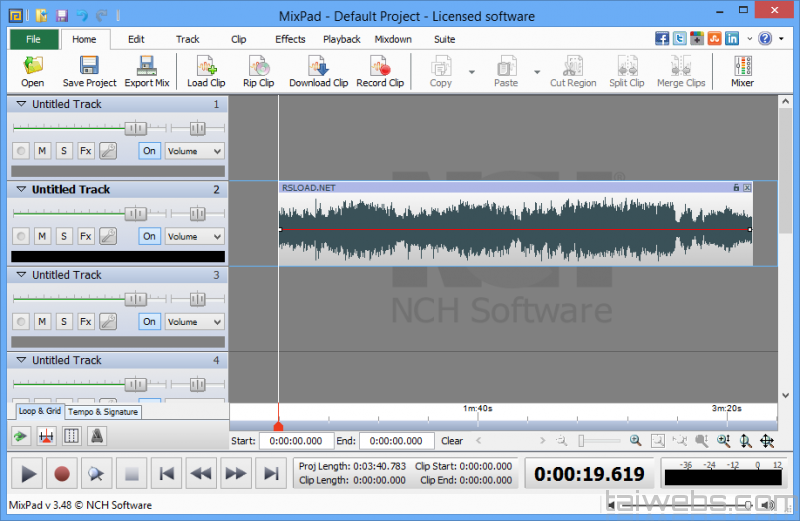
The user interface of MixPad Masters Edition is structured around a clean, touch-optimized timeline layout. Audio clips are displayed visually, with waveform previews that aid in precise editing and alignment. Navigation is straightforward, with clearly labeled controls for playback, track management, and effect application. The app’s responsiveness is consistent across various device categories, though specific performance metrics were not disclosed by the developer. Although the developer did not list formal performance metrics, the app maintains smooth operation during multi-track playback and editing, indicating efficient resource management. Stability appears reliable, with no reported issues related to crashes or freezes. The visual design prioritizes functionality over ornamentation, using color-coded track indicators and intuitive icons to enhance usability. For users accustomed to desktop DAWs, the mobile adaptation retains core workflows while adapting to touch-based interaction. The app’s ability to handle complex projects without lag suggests optimized backend processing, even on mid-tier devices. Overall, the UX design successfully balances power and accessibility, making it suitable for both experienced producers and those transitioning from simpler audio tools.
Platform Compatibility & Technical Requirements
MixPad Masters Edition is available on Android, with a current version of 7.07. The app has a file size of 23.5 MB, indicating a lightweight footprint that supports efficient installation and storage usage. The developer did not specify minimum OS requirements, nor did they list supported device models or hardware specifications. Compatibility information was not fully disclosed. However, the app’s relatively small size and targeted use case suggest it is optimized for modern Android devices. Users should ensure their device meets standard Android system requirements for running productivity applications. No additional permissions or external dependencies were mentioned in the provided data. The app is available for purchase at a one-time price of $49.99, reflecting its professional-grade functionality and feature set.
Pros and Cons
Pros
- Unlimited track capacity enables complex, layered audio productions.
- Supports a broad range of audio formats, enhancing file compatibility.
- Intuitive drag-and-drop interface suitable for users of all experience levels.
- High-quality audio mixing and editing tools for professional results.
- Lightweight design with a small file size for efficient storage.
Cons
- Specific system requirements were not listed by the developer.
- Compatibility with older Android devices is not confirmed.
- Price point may be high for casual users or beginners.
- No information provided on cloud sync or cross-device project sharing.
- Developer did not disclose update frequency or future feature roadmap.
FAQ
Is MixPad Masters Edition available for iOS?
The app is currently available on Android. The developer did not provide information on iOS availability.
Can I use MixPad Masters Edition without an internet connection?
Yes, the app functions fully offline. No internet connection is required for audio editing, mixing, or project saving.
What audio formats does the app support?
MixPad Masters Edition supports a wide range of audio formats, though the specific list was not disclosed by the developer.
How often are updates released for the app?
The developer did not specify the update frequency or release schedule.
Is the app secure to download and install?
As a product from NCH Software, a known developer in the audio software space, the app is considered secure. Users should download from official sources to ensure authenticity.
Final Thoughts
MixPad Masters Edition stands out as a robust mobile solution for professional audio production, offering capabilities typically reserved for desktop DAWs. Its unlimited track capacity, extensive format support, and intuitive interface make it a compelling tool for audio creators who demand flexibility and precision. While the lack of detailed system requirements and update transparency may raise questions for some users, the app’s core functionality remains strong and reliable. It is particularly well-suited for mobile professionals, podcasters, musicians, and audio engineers who need a portable yet powerful mixing environment. The $49.99 price tag reflects its advanced feature set, positioning it as a premium tool in the mobile productivity space. For those invested in high-quality audio creation, MixPad Masters Edition delivers significant value. Download MixPad Masters Edition now.
Guides & Tutorials
How to install MixPad Masters Edition
- Click the Download button above.
- Once redirected, accept the terms and click Install.
- Wait for the MixPad Masters Edition download to finish on your device.
How to use MixPad Masters Edition
This software is primarily used for its core features described above. Open the app after installation to explore its capabilities.
User Reviews
No reviews yet. Be the first to share your experience.
You may also like
more
Que no te pillen¡
About !Que no te pillen¡Reviewed by Jason A. BilbreyShow MoreShow Less

3D Combat Zone
About 3D Combat ZoneOriginally released in 1983, 3D Combat Zone immerses players...

666: El día del portal
About 666: El día del portalOn June 6, 2006, Agent P. Stone uncovers a sinister...

80 in 1 Best Flash games
About 80 in 1 Best Flash games 80 in 1 Best Flash games is a collection of 80 fl...

ABYSS SEEKERーーWhat Do You See Deep in The Abyss
About ABYSS SEEKERーーWhat Do You See Deep in The AbyssIn ABYSS SEEKER, players...

ACA NEOGEO THE KING OF FIGHTERS 2002 for Windows
About ACA NEOGEO THE KING OF FIGHTERS 2002 for WindowsTHE KING OF FIGHTERS 2002,...